Updated · iOS 27 · 10 min read
Screen Time Limit Not Working? Fixes + the Real Reason
If Screen Time isn’t working on your iPhone the way you hoped, it’s not broken — it’s working exactly as designed. That’s the uncomfortable part. You set a Screen Time limit on Instagram. Thirty minutes a day. You feel responsible.
By 10am, you’ve hit the limit. Instagram shows a message: “Your downtime limit has been reached.”
You tap “Ask for More Time.”
Nothing happens. You already set the passcode. You know it. You tap it in. The passcode works. You’re back in Instagram.
One minute, you felt restricted. Now you feel fine. Discipline restored.
Except nothing changed. You just overrode your own rules.
This is the core problem with Apple Screen Time for adults. You’re not restricted by technology. You’re restricted by yourself. And you already know how to convince yourself.
Screen Time limit not working? Check these first
Most “not working” limits on iOS 27 come down to six checks: an app in Always Allowed, a shared Time Allowance running out sooner than you expect, a Screen Time Schedule that’s off, devices that aren’t all on iOS 27, a passcode you can use to override everything, and apps that aren’t in the category you think. Work through them in order; each takes a minute.
Where to check each setting
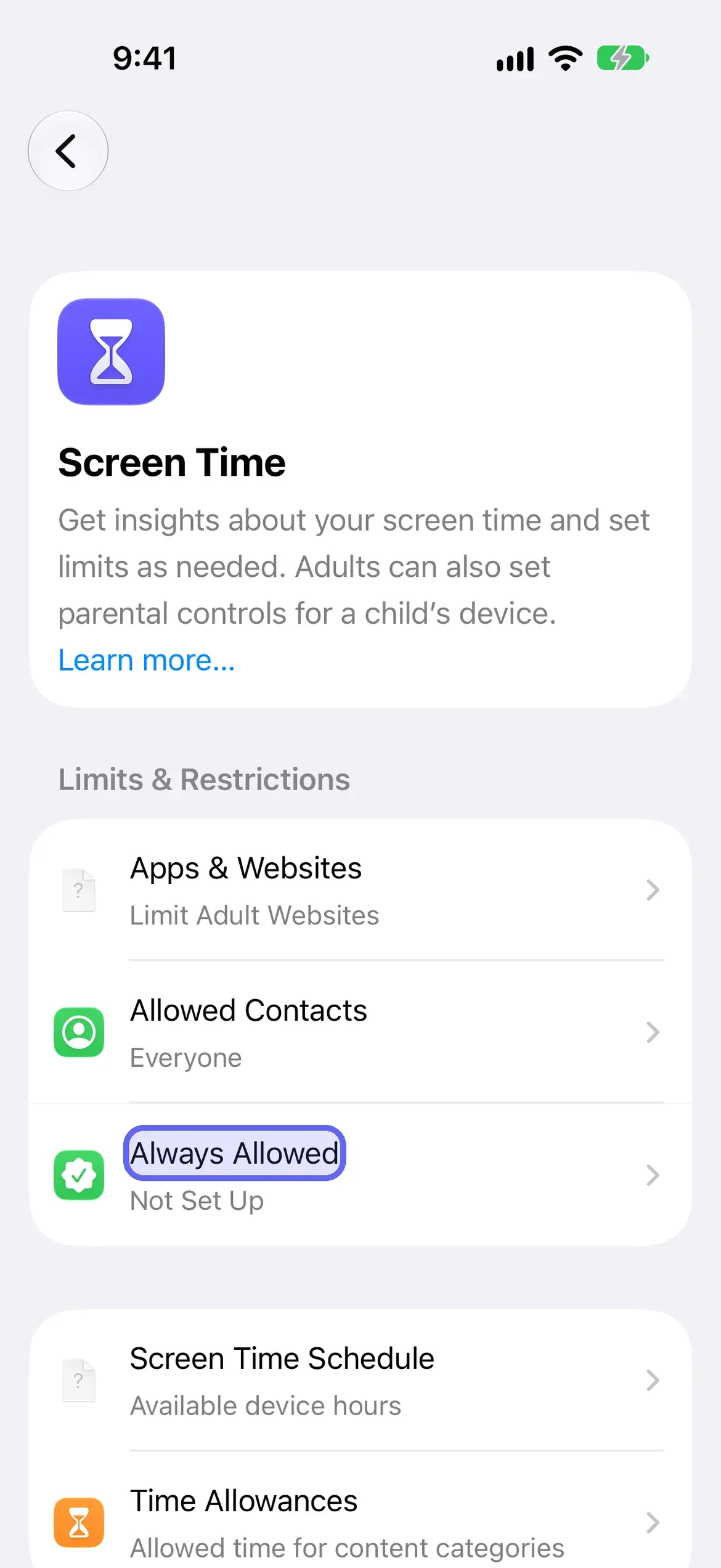
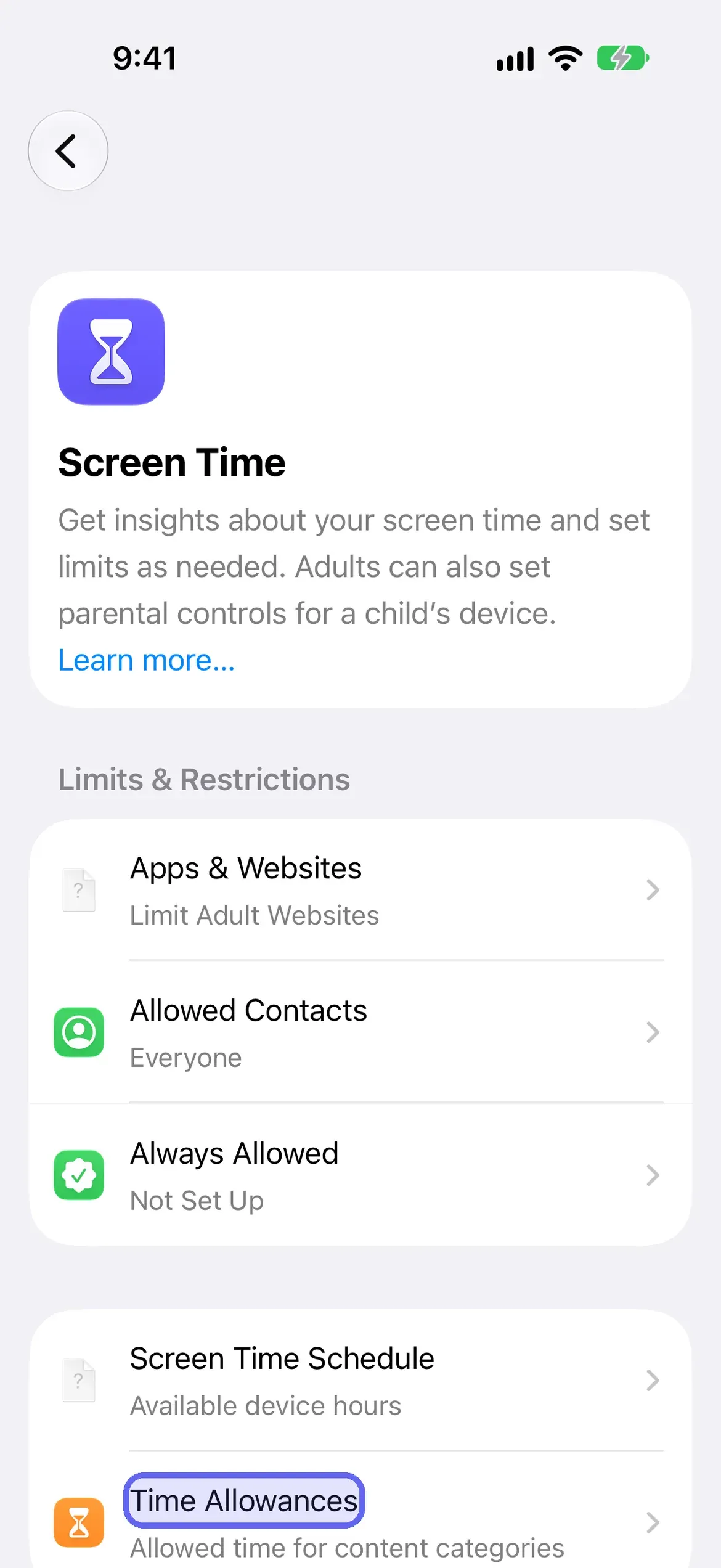
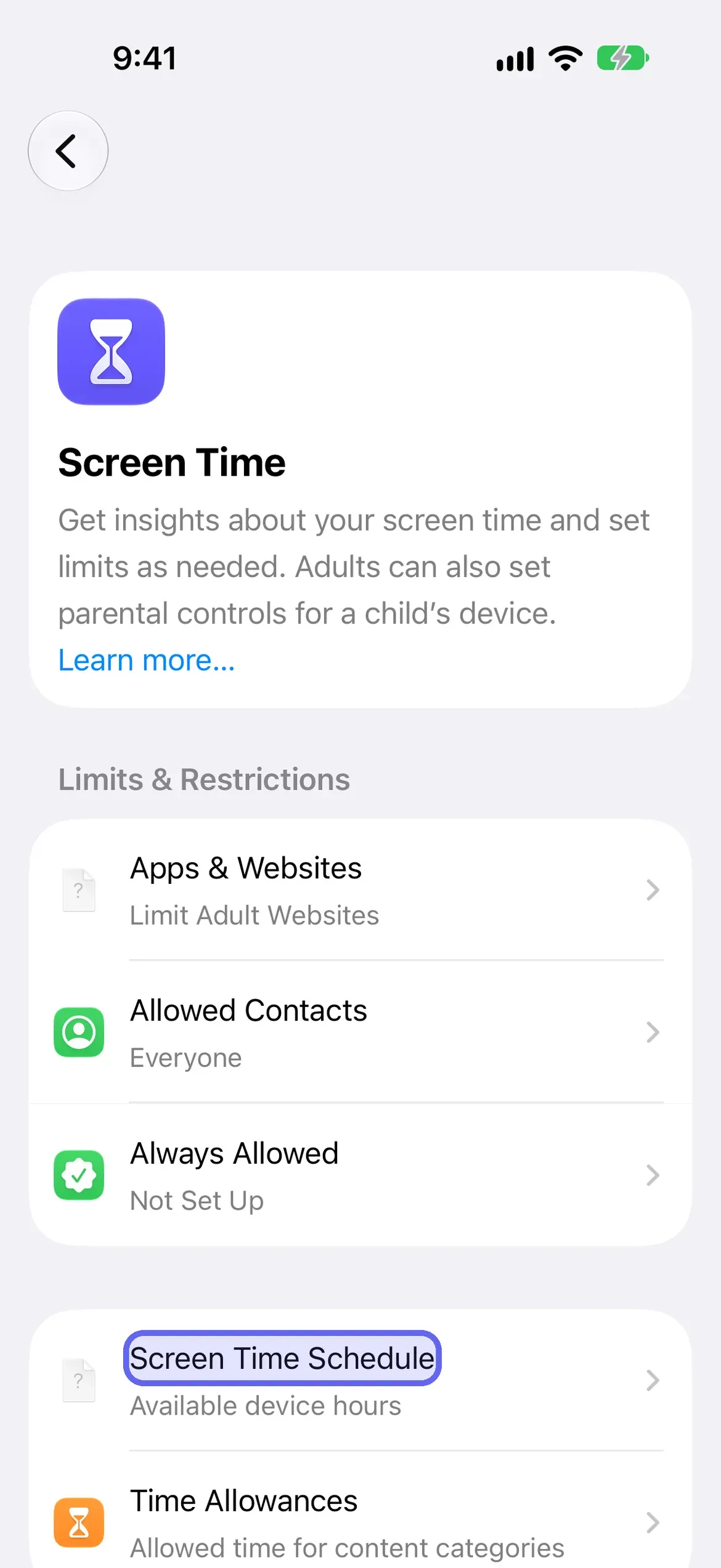
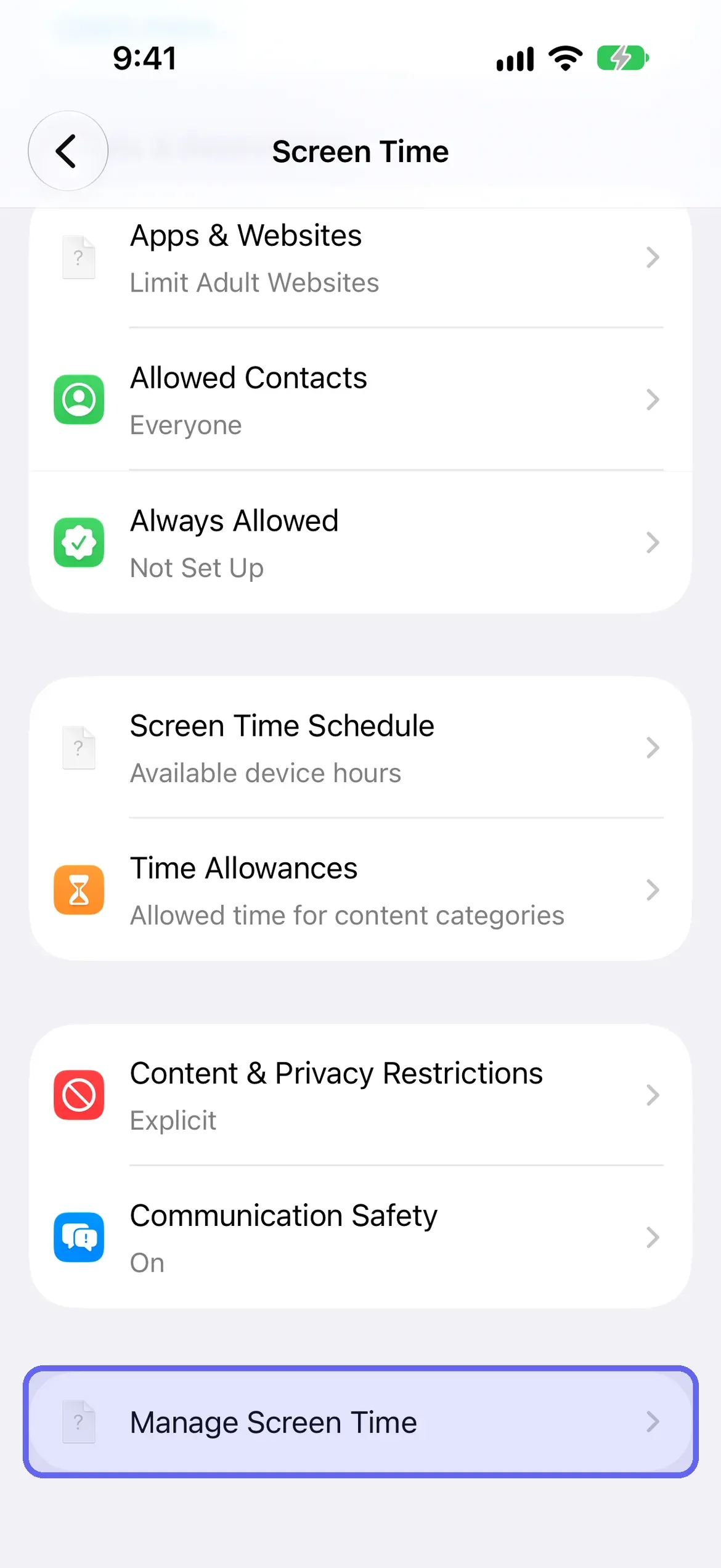
- Check Always Allowed. Apps in Settings → Screen Time → Always Allowed stay available regardless of any schedule or allowance, so a limit can’t catch them. Remove the app from that list, or it will never be limited. Apple describes Always Allowed as apps and contacts you can use “at all times”, even during a schedule.
- Check which category the app is in. On iOS 27, Time Allowances work by category (Entertainment, Games, Social Media). Open Settings → Screen Time → Time Allowances → Manage Categories, tap a category, and look for the app. If it isn’t in a category with an allowance, nothing limits it. Apple says apps use up their category’s allowance or the daily total, whichever comes first.
- Check that the schedule is on. Open Settings → Screen Time → Screen Time Schedule and make sure Schedule is switched on, and that the time window you expect covers the hours you’re checking. To apply allowances only during schedule windows, turn on Match Screen Time Schedule in Time Allowances.
- Update every device. Apple says Screen Time Schedules and Time Allowances need iOS 27, iPadOS 27 or macOS 27 or later on all your Apple devices. If one device is behind, settings you made may not behave as you expect. Check Settings → General → Software Update, and turn on Share Across Devices under Manage Screen Time if you want one set of settings.
- Check who knows the passcode. If you set the Screen Time passcode, you can change any of the above. Nothing is “broken” when you override a limit with a code you know.
- Restart and update. If all of the above is right and a limit still doesn’t trigger, restart the iPhone and install any iOS update. Apple’s Screen Time pages don’t list a specific bug here, so treat this as general troubleshooting, not a documented fix.
What if your phone is on iOS 26 or earlier?
On iOS 26 and earlier, the checklist is different. Apple’s iOS 26 guide says that by default, Screen Time limits can be ignored once they’re reached, so the first fix is a Screen Time passcode plus Block at Downtime (Settings → Screen Time → Downtime). Then check Always Allowed, whether the limit covers the app or only its category, and your iOS version.
- Limits can be ignored by default. Apple’s note: “By default, Screen Time limits can be ignored once reached.” Its documented fix is Downtime with a passcode. With Block at Downtime on, restricted apps can’t be opened during downtime and appear dimmed with an hourglass. With it off, you get a reminder and can continue.
- The five-minute Downtime reminder. When you schedule Downtime, Apple sends a reminder five minutes before it begins. You can ignore it, or turn Downtime on until the scheduled start. Searches for “ignore downtime until schedule” are usually about this reminder. Apple’s pages don’t use that exact phrase.
- Always Allowed. Apps in Settings → Screen Time → Always Allowed stay available after a limit is reached, and during Downtime.
- Category versus app. In App Limits → Add Limit you choose categories first, then tap a category name to pick individual apps. Apple says one time limit applies to everything you select together.
- Update and restart. If a limit still doesn’t trigger, restart and update iOS.
You may see guides mention a Block at End of Limit toggle or a One More Minute prompt. We couldn’t confirm those labels on Apple’s current iPhone pages, so open your limit on the phone and read what it offers.
Once the checklist is clean and a limit still gets overridden, the cause isn’t a bug. It’s the next section.
The Core Problem: You Set the Passcode, You Know the Passcode
Here’s what happens when you hit a Screen Time limit:
- You see a notification: “Instagram downtime limit reached.”
- You tap “Ask for More Time.”
- iOS prompts for your Screen Time passcode.
- You enter the passcode you chose.
- It works.
- You’re back in Instagram.
The system assumes two things:
- You want the restriction to stick. If you really didn’t want to use Instagram, you wouldn’t have set a 30-minute limit—you would have blocked it entirely.
- You can override the restriction. The passcode isn’t a mystery. You chose it. You wrote it down. You remember it.
The system is designed for awareness, not enforcement. It’s a speed bump, not a wall.
If you’re trying to change your behavior, awareness sometimes works. For most people, most of the time, it doesn’t. You already know you’re spending too much time on Instagram. That knowledge hasn’t changed your behavior yet.
What changed in iOS 26.4
Before 26.4, the six-step walkthrough above was the whole story: even a partner-set App Limit passcode didn’t stop you from going around it entirely by disabling Screen Time in Settings.
After 26.4, Settings → Screen Time → Manage Screen Time has Lock Screen Time Settings — Apple’s path for setting the Screen Time passcode (not a second one): the passcode “must be entered before you can change any Screen Time settings.” Third-party guides report that since 26.4 the same passcode also gates turning off Screen Time itself (disabling an app’s access, or deleting it); Apple’s own pages don’t spell that out, so test it on your phone. The catch: it only helps if someone else sets it. Set your own, and you’re back to square one — you know it, you can undo it.
It’s also not airtight yet. Developer forum reports (developer.apple.com/forums/thread/821959) documented a real bug on 26.4/26.5: the Settings → Apps → [App] toggle could still be disabled with Face ID instead of the Screen Time passcode. Apple confirmed it in May 2026; the fix is showing up in the 26.6 and iOS 27 betas as of this writing, so on an unpatched 26.4 or 26.5 that gap may still be open. Erasing the device, and a passcode-forgot flow that falls back to Apple ID recovery (if that backup was set up), still work too.
None of that makes the setting pointless — it’s a real increase in friction, and the honest summary is the same as everywhere else in this post: harder to bypass, never impossible. A partner-approved lock on top of it adds the one thing Apple’s setting still can’t: someone finding out when you try.
What Screen Time Can’t Do
Enforce limits on adults who know their passcode. You set it, you know it, you can override it in seconds.
Involve another person. Screen Time is one-directional — you set the rules, you follow (or don’t follow) them. No one approves or denies your requests.
Detect or report bypasses. Disable Screen Time entirely from Settings and nothing happens — no notification, no record.
Stop you from using an app. It limits usage time, not access — it nags you after your limit, but you can still open the app.
Why You Can’t Fix This By Yourself
This isn’t a knock on your discipline. It’s a structural problem with any system where the enforcer and the person being enforced are the same person.
Think about what it actually takes to keep a Screen Time limit in place at 11pm on a bad day. You have to notice the notification, decide the rule matters more than the impulse, resist typing in a passcode you know by heart, and do all of that while you’re tired, stressed, or bored — which is precisely when self-control is weakest.
Psychologists call this ego depletion: self-control draws from a limited resource that gets used up over the day. Whether the strict model holds up in every study or not, the everyday experience is familiar — the version of you that sets a 30-minute limit at 9am is not the version deciding whether to override it at 11pm. Screen Time asks late-night-you to enforce a rule morning-you wrote. Late-night-you always wins, because late-night-you holds the passcode.
This is also why “just delete the app” doesn’t fully solve it. You can redownload it in ten seconds with the same Face ID that unlocked your phone. The barrier isn’t technical. It’s you, and you’re a soft barrier to yourself.
The Partner-Held Key: The Structural Fix
The actual fix isn’t a stricter setting hidden somewhere in Screen Time. It’s removing yourself as the enforcer entirely.
If the passcode lives with someone else — someone who has to say yes before the app unlocks — the whole failure mode stops applying. Late-night-you can still want to override the lock, but can’t, because late-night-you doesn’t hold the key. Getting back in now requires texting someone and explaining why, and that conversation is uncomfortable in a way tapping a memorized passcode is not.
This is the mechanism LockPact is built around. You and a partner each pick apps to lock on your own device; only they can approve your unlock requests, and only you can approve theirs. Apple still makes it architecturally possible for either of you to bypass Screen Time from Settings — that part can’t be prevented, and no app claiming otherwise is telling the truth. What changes is that a bypass doesn’t happen invisibly. Your partner gets notified. The override isn’t private, so it isn’t free.
That’s the actual structural difference between Screen Time and a partner-held lock: Screen Time makes overriding easy and invisible. A partner lock makes overriding possible but socially costly. It doesn’t out-engineer your discipline. It changes who’s holding the key.
LockPact isn’t the only app built around this idea — see the full roundup of apps that let a friend control your screen time for how the mechanics differ from one to the next.
How These Tools Compare
| Tool | Approach | Strength | Weakness | Cost |
|---|---|---|---|---|
| Apple Screen Time | Awareness | Integrated, free | Easy to override | Free |
| ScreenZen | Friction | Low barrier to entry | Adaptation & frustration | Free |
| AppBlock/Opal | Solo blocking | Hard enforcement | Still requires willpower to not override | $2–5/mo |
| LockPact | Partner accountability | Social enforcement | Requires mutual commitment | Free |
The Uncomfortable Truth
Most people fail at self-imposed limits not from lack of willpower but because willpower is finite — and Apple’s own design makes overriding a two-tap process, since it can’t tell “I need Maps” from “I’m relapsing on TikTok at midnight.”
When someone else is the enforcer, the calculus changes. You still might override. But now there’s a conversation about it — not because the technology got stronger, but because the cost of quitting quietly disappeared.
Next Steps
If you use Screen Time on yourself, not a child: Screen Time for Adults on iPhone — why the design assumes two people, and what to do when you’re both of them.
If you want the Instagram-specific version of this: How to lock Instagram after a time limit, or during certain hours — the same Lock Screen Time Settings mechanic, applied to one app.
If you want the full walkthrough: Lock Screen Time Settings: Give Your Partner the Passcode — the step-by-step setup, written for the partner who’s holding the code, plus the honest loopholes that remain.
If you want to understand partner accountability better: Why screen time apps fail—and the exception.
If you want to compare blockers: The best free app blockers for iPhone in 2026.
If you want to see how LockPact compares to specific tools:
Sources
Steps checked against Apple's iOS 27 guides on October 16, 2026. We re-check every 90 days. Editorial policy.
Frequently Asked Questions
Why is my Screen Time limit not working?
On iOS 27, check Always Allowed, the app's category under Time Allowances, that your Screen Time Schedule is on, and that every device runs iOS 27. On iOS 26 and earlier, limits can be ignored by default; Apple's fix is a passcode plus Block at Downtime.
What does 'Ignore Until Schedule' mean?
Apple's pages don't use that exact phrase. On iOS 26 and earlier, they describe a reminder five minutes before Downtime starts that you can ignore or use to turn Downtime on early. On iOS 27 the equivalent is the Screen Time Schedule.
Can adults bypass their own Screen Time?
Yes, by design — you set the passcode, you know it, and Apple's security model lets the device owner remove restrictions via Settings. iOS 26.4's Lock Screen Time Settings closes most of this, but only if someone else holds that passcode, not you.
What does Lock Screen Time Settings do in iOS 26.4?
It's the menu path for setting the Screen Time passcode, not a second passcode (Apple's wording: the passcode must be entered before you can change any Screen Time settings). Third-party guides report that since iOS 26.4 it also gates turning off an app's Screen Time access. It only helps if someone other than the device owner sets it.
Does Screen Time work if someone else sets the passcode?
It works much better. The device owner can't tap through 'Ask for More Time' anymore — they have to ask the person who holds the code. iOS 26.4 extends that same principle to turning Screen Time off entirely.
Why doesn't Screen Time actually stop me from using an app?
Because it isn't designed to. Screen Time is an awareness tool — it nags you after a limit you set yourself, with a passcode you chose. It was never built to enforce a restriction against the person who controls it, because that person is you.
Can I make Screen Time harder to bypass?
More than before. As of iOS 26.4, Lock Screen Time Settings — set by someone other than you — gates disabling Screen Time behind the Screen Time passcode (per third-party guides; Apple doesn't spell it out). Not bulletproof: a Face ID bypass path was reported and confirmed on some 26.4 and 26.5 versions (Apple is fixing it in the 26.6/27 betas), and erasing the device or an Apple ID passcode reset still work. Harder to bypass, never impossible.
Does a partner-held lock actually stop bypassing?
No — and no app can honestly claim otherwise. What it does is make bypassing visible. iOS 26.4's Lock Screen Time Settings raises the bar meaningfully if a partner holds the code, but doesn't eliminate every path. LockPact detects when a bypass happens and tells your partner. The value isn't unbreakable enforcement; it's that you can't quietly cheat your own commitment anymore.
Is Screen Time worth using at all?
Yes, as a diagnostic. It's genuinely useful for seeing how much time you're actually spending per app — most people underestimate it. Where it falls short is enforcement for someone who already knows the number is bad and wants a reason not to override their own limit.